
Innovation Without a Finish Line.


Whether you’re a broker, an agency, a family member, an individual, or anyone else within the care team, we’re here to support you. You need simplicity, reliability, and exceptional service—and that’s why we continually evolve our software to meet today’s demands while anticipating tomorrow’s requirements. With more than two decades of experience, eVero is a pioneer in delivering innovative solutions built for the complex, ever‑changing needs of the care community.

At eVero, our software platform is never “finished.” Every system and application is developed and refined by our in‑house team, allowing us to enhance features, introduce new capabilities, and improve user experiences year‑round. When you partner with us, you can feel confident knowing you’re supported by a platform designed to empower your best work—one that’s intuitive, reliable, and always advancing.

Our development process isn’t static; it’s a continuous cycle of improvement. We call it the eVero Infinity Development Cycle—a commitment to ongoing innovation that ensures our software grows with you, your organization, and the industry.
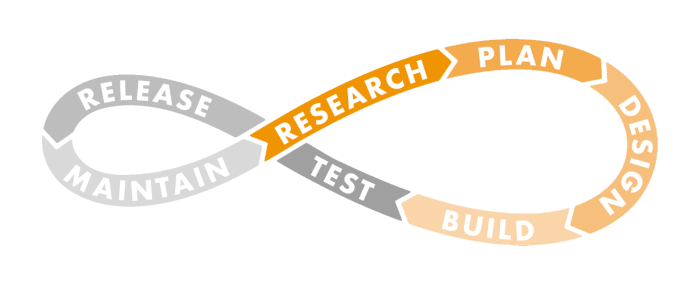
 

  • Research – We monitor industry trends, regulatory guidelines, and user suggestions to identify areas of need. We highly value user input and actively seek feedback – via regular user group meetings, surveys, etc. – to identify potential changes to feature sets, reporting options, and/or the user interface.
  • Plan – Using the research gathered, our Software Development and Product Management teams evaluate the findings to determine which enhancements will bring the most value to our customers and impact the most users. They then define a prioritized list of items to move forward with for the next release.
  • Design – Our Development Team translates business requirements from the selected items into a framework for the desired workflows and feature sets. This framework is then reviewed by the Product Management team to ensure functionality, viability, and client satisfaction.
  • Build – Once the design plan is set, the Software Development team codes the software to add new features and functionality and/or enhance existing capabilities following the approved framework. What you experience on the front end is a well-researched and planned interface.


  • Test – On the back-end there are multiple rounds of testing to ensure a seamless experience for all users.  All updates undergo technical tests to ensure they work as designed and coded, and business tests to see if they function properly, and efficiently and deliver the expected business outcomes. Quality assurance testing (QA) is also part of this stage.
  • Release – After successful testing, the new items go into the production schedule. To help you understand the updates, a detailed Release Notes document is created and posted on eVero Ed, and email notifications are sent to users summarizing the benefits and highlighting available webinar training sessions and written resources. Rest assured that with each release, we’re here to help you understand the value and impact!
  • Maintain – The job is not done after the release!  Our team monitors the usage and application health of the newly released items to find any recurring issues or possible vulnerabilities. We solicit user feedback to make sure the new functionality is meeting user needs, and to get ideas for possible improvements to continue to evolve our platform to support better health outcomes.


Recent Software Release Highlights

June 2026 Release

  • AI Document Translation is now available for internally and externally created Meeting Notes, Monthly Summary & Service Plan documents. Over 30 languages are available.
  • PDF Form Mapping and Dynamic Signature Updates: Users can now create custom fields, including text boxes and checkboxes, to improve document configuration and form setup.

May 2026 Release

  • New Module: Vendor Management has been added to bring all Vendor Management functions together in a single, centralized location.
  • Weekly Scheduling for Habilitation Plan dropdown added to enable weekly scheduling of goals, allowing users to complete required activities on any day within the week rather than on a daily basis.

April 2026 Release

  • Budget Upload Validation Adjustment: When a new individual is uploaded into the system via the current budget template, and the individual’s sex is listed as “X”, the system will allow the profile creation process to proceed.
  • A new validation, Missing/Invalid Medicaid Number, has been added to the Intake Issues on the Claims Dashboard to flag claims where the Medicaid number is either missing or contains some invalid character(s) such as invisible characters.

March 2026 Release

  • AI Text Enhancement has been added for all text fields in digitalAGENCY™. This feature allows users to enter text and then select the enhance button to enhance it, correcting grammatical and stylistic issues.
  • Detailed Audit Tracking – My Assessments (DLA, POM, LOS)
    has been added to several screens and modules. This feature lets users see every edit made to entries on a page, showing the field that was changed, the previous value, and the updated value

February 2026 Release

  • Meeting Types by Program Settings:  Meeting types are now managed in the Admin Toolbox under Meeting Types, giving administrators control over which categories are available. 
  • Capture Client View Aligned with Program Caseload Settings: The Program Setting named ‘Is CaseLoad for Site Based Enabled’ will now apply to the Capture Module the same way it applies to Service Delivery and the Facility Roster screens.

December 2025 Release

  • Contemporaneous Settings at the Program Level by adding multiple settings to the Program Settings screen, previously only available at the agency level.
  • Introducing Facility Fee for Billing: Now manage Facility Fees directly in the Billing Module, with options to add, copy, and submit fees for streamlined processing.
  • Roster Note Rejection Widget provides a dashboard view of rejected Service Notes with exportable details and quick navigation to the roster for faster resolution.
  • Encounter Module Enhancement: Add Providers Directly from Form View simplifies provider management by enabling users to add new healthcare providers directly from the Encounter Form View.

Recent Software Release Highlights

November 2025 Release

  • Customized Medication Buffer Time-  introduced in the eMAR module under the Order/Pharmacy order screen- allows users to define a personalized buffer time for medications upon receipt and scheduling, improving flexibility and accuracy in medication administration workflows.

August 2025 Release

  • Document Tree Front-End Management to create Document Groups, Subgroups, and Types directly in the Admin Toolbox—and even merge multiple Document Types into one for better organization.
  • New Vendors Above Average Cost Limit Widget dashboard to track vendors exceeding cost limits, helping prevent fraudulent invoices and payments.
  • Increased Visibility into Overspent Items on Budget Review ensures FI users see overspent category validations during budget approvals, improving oversight and reducing errors.

June 2025 Release

  • Transportation Reviewed Date and Time Change – Time will now show for the Portal Review action for Transportation and Staff Activity Fee entries.
  • Billing Module Update – “Close Claim” option added to allow users to directly close a selected claim from within the claim detailed view.
  • DSP Evaluation Module – A new future validation check with pop-up warning has been added.

May 2025 Release

  • Circle of Support Meeting Tracking Screen added to help maintain compliance by aligning with individual agreement dates.
  • Bulk Billing Rate Screen added to help admins update across Programs, Facilities, and Departments with just a few clicks.

April 2025 Release

  • Billing Module – Delay Reason Code form can be printed directly within the system, based on the specific code entered for a claim.
  • FSS Module – Committee Meeting Export Updated.
  • Individual Module – Authorizations can now be edited in the middle of a term, and a Reconciliation notice will help administrators track the Authorization and its utilization.
  • Manage Users Module -“Other Medical Info” data element has been added to the Health Information screen.

March 2025 Release

  • Admin Toolbox: Streamlined Site Transfer & Discharge – New transfer details pop-up allowing program and facility modifications, and addition of “Discharge” button for individual and bulk discharges.
  • Facility Module Update – Enhanced Leave Occurrence Tracking and Export Options.
  • Enhanced Time Entry Validation for Self-Hired Program – STOP & START screen updates with a new validation for roster time entry ensuring entries are within both authorized units and dollar
    amounts.

January 2025 Release

  • Billable Note Rejection Management – Enables users with the Checklist Supervisor role to reject and unreject
    service entries across key modules. When a service entry is rejected, key details are
    recorded to ensure accountability and transparency, and accurate records.
  • Optimized Views and Processes – enhancements to the ACCELERATE™ Billing platform to improve usability, performance, and accessibility.
  • Programmatic Changes in Self Direction:
    • SDS Voucher Billing Processes and New Voucher Form
  • Regulatory Changes for SEMP 
    • SEMP Authorization Validations beyond 200-hour limit
    • Support for billing 1:1 Manger and Staff SEMP Meeting
  • Enhanced Reminder for Distributing Staff Action Plans – added a pop-up notification during the plan approval process.

December 2024 Release

  • Self-Hired Budget Hour Tracking Screen – Admins can look up Self-Hired Staff utilization for a specific program and month, broken down by week.
  • Enhanced EVV Audit Trail -now includes location coordinates for each entry, providing more detailed tracking for audit and compliance purposes.
  • New “Change Episode” Option –Allows Staff to move appointments if they were mismanaged or incorrectly associated with the wrong encounter.

September 2024 Release

  • Enhanced “Raise Issue” Feature – now available in new areas including Staff Activity Fees, Mileage, SDS-FI transport, Activity Screens, FI Rate Approval, and Broker Billing Summary.
  • Mileage Entries -users can verify location addresses or automatic mileage calculations through web app to match mobile app functionality.
  • Communication Log – Users can customize categories within the Capture module to better align with log notes being created.

June 2024 Release

  • Case Management  – fresh interface to improve usability and visibility. Admins can view cases by Supervisor, Case Manager or Individual. Individual view now allows filtering.
  • UB04 Compliant Billing Forms -forms can now be printed right from the platform, individually or in batch.
  • CNBA to FBA Conversion Support – All information is automatically transferred, with alters for information that doesn’t meet requirements.

March 2024 Release

  • Billing Module (ACCELERATE)  – Added a new process for claims to allow for the ability to Reverse Payment and push the claims back to the Payment Pending bucket if the transmission type is CSV, X12, SELF Pay, or Voucher.
  • Dashboard/Widget Update – The Document Status widget now includes new categories so users can now see documents due for 45 days and 60+ days.
  • Employee Time Module – Employee Time Reviews now include more detailed User and Time info, and will clarify which portal users have reviewed group sessions, as well as which reviews are remaining.

December 2023 Release

  • Incidents Module: Added functionalities within this module to refine our users’ workflows, offering capabilities such as filtering removed incidents, additional screen permissions, follow-up statuses, and more.
  • Encounters Module: Enhanced the capabilities of this module to elevate our users’ workflows. This involves introducing four new filters to streamline task management, providing opportunities to include detailed descriptions, upgrading table views, and implementing various other enhancements.

September 2023 Release

  • New Widgets: Enhanced our overall web interface with more widgets such as the Rollover Budget Widget, DPPS/ASSD Cap Widget, and Improved Waiver Status Widget to optimize information transparency for users.
  • New Features for Individual and Facility Modules: Both modules have undergone enhancements, incorporating new lists, fields, and functionalities. These updates are designed to empower users to oversee their facilities or manage individuals more efficiently.

June 2023 Release

  • Broker and FI Portal: The Broker and FI portals have undergone updates, resulting in a streamlined workflow and enhanced user-friendliness. These improvements aim to offer users a more efficient and user-centric experience.
  • Mobile Web Availability:
    The Employee Time and Encounters module have undergone optimization to seamlessly integrate with the Mobile App, encompassing enhanced UI updates and additional features.

March 2023 Release

  • Analytics Dashboard: A new module featuring dashboard views designed to consolidate the agency’s demographic, billing, and attendance data into a unified and easily accessible interface.
  • Manage Users Revamp: Fresh, new look and smoother workflow have been incorporated into the module.

Recent eVeroPortal App Release Highlights

June 2026 eVeroPortal Release

  • Invoice Validation messages have been updated so all validation messages will be displayed in a list, so users can go through and read each before proceeding, rather than showing each message one at a time.
  • A new option, “Save as Template,” is now available on the Mileage Trip Details screen, allowing users to save entered mileage information for future use.

November 2025 eVeroPortal Release

  • Favorite Location Listing now displays favorites based on usage frequency—your most-used locations appear at the top for quicker selection.
  •  FRR Overnight Handling automatically splits invoices for overnight time periods when the Overnight checkbox is selected, ensuring accurate calculations and reducing manual corrections.

March 2025 eVeroPortal Release

  • New Invoice Copy Feature – An efficient way to duplicate and submit frequently used invoices. Once an invoice is submitted users can generate a new invoice based on the existing one.

April 2024 eVeroPortal Release

  • Simplified Invoice Interface: Eliminated the Processed status on the Invoice Approval/Payment interface to improve navigation on the Invoice screen.
  • Facility Module – Enhanced Tracking with “Exceeded Authorized Daily Limit” Feature; added ability to track non-authorized locations via Geofencing, and added a new program setting for Activity Log Tracking per Shift.
  • ISS/ FSS – Added new fields to Vendor Management profile, a new review option for Traditional and SDS Housing billing activity logs, and drag and drop capabilities on the Housing Subsidy Vendor Management Page.

November 2023 eVeroPortal Release

  • DSP Evals: We’ve streamlined the DSP evaluation process by seamlessly incorporating it into our app, ultimately saving them valuable time and effort.
  • Enhanced User Feedback: Users can effortlessly share their feedback in new surveys with our new notification banner.

April 2023 eVeroPortal Release

  • Invoice: The Invoice screens underwent enhancements incorporating new features to improve transparency, streamline workflows, and mitigate potential human errors. These upgrades include additions such as monthly budget warnings, new filters, and an invoice history feature.
  • Dashboard: The new advanced myCarePortal dashboard has become the landing page for the everoPortal app.

Recent eVeroMobile App Release Highlights

July 2026 eVeroMobile Release

  • Site-Based Authorized Location Tracking – Geofence tracking has been introduced for site-based programs within the Punch In/Out module.
  • Offline re-login is now supported for the Service Delivery and SEMP Note modules, so if a user is automatically timed out due to inactivity while working within an active session and biometric authentication is enabled, they can re-authenticate and regain access even without an internet connection.

February 2026 eVeroMobile Release

  • AI Summary Enhancements across the SD, Summary Edit, Monthly Summary, and SEMP Monthly Summary screens.  To improve visibility and tracking, Text Similarity Percentage and the Total Count of AI-generated comments fields have been added to display both metrics.
  • The Employee Punch-In process has been updated to improve department accuracy and reduce downstream timecard corrections, especially for community-based programs.

September 2025 eVeroMobile Release

  • Mobile Modules Redesign & Optimization brings improved usability, speed, and consistency across platforms for Transportation, Incidents, Encounters, Monthly Summary, and Employee Info.
  • Primary Language Flexibility ensures the app works on devices set to non-English languages without requiring a manual language switch.
  • DSP Evaluation Updates add support for Primary DSP functionality and new fields to track next steps and promotion potential.

April 2025 eVeroMobile Release

  • Site-Based Location Validation – Admins can now enable location validation for staff punch-in and punch-out of site-based programs using a mobile device.

December 2024 eVeroMobile Release

  • Non-Geofenced Service Location
    Prompt:
    Staff punching in or out from an unauthorized location will be prompted to provide a reason, ensuring compliance and accountability.
  • Enhanced Mobile Editing for Site-Based Service Documentation: Enables staff to make timely corrections or updates directly from the app.
  • New Missed Documentation Category: To help staff identify and address undocumented services.

June 2024 eVeroMobile Release

  • Post-Session Documentation: Add the ability to enter notes and document services after the session is completed.
  • External Link Dashboard Update: Users can add inks, like Payroll Login, eVeroEd, and Contact Us pages, to their dashboards.
  • Trip Detail Templates: Users can add Frequently Visited Locations to the templates in the app.
  • DSP Evaluation: Now featuring a resizeable Preview Window and a Relation Dropdown Menu for easier navigation.

January 2024 eVeroMobile Release

  • Overtime Management: Set warning alerts based on the total time worked across all programs, including agencies using Auto Employee Time..
  • Covid-19 Vaccine and Test Results: Display setting can now be modified directly in the Admin Toolbox
  • Enhanced Geo-fencing: Now ensures location verification at the end of each session (in addition to start)

October 2023 eVeroMobile Release

  • Semp Note: We enhanced DSPs’ capabilities by enabling them to seamlessly incorporate Service, Valued Outcome, and Methodology details into their Service Notes using the SEMP Note module. This enhancement significantly boosts efficiency in their workflow.
  • Documents Module: We have improved the image rendering and scanning capabilities for individual and employee documents. Additionally, we’ve introduced the ability to convert uploaded documents into PDFs from the Document Tree, empowering users to have quality documentation and flexible export options.

January 2023 eVeroMobile Release

  • Site-based location capture: Users can now streamline location capture for non-session-based programs through Punch in/out, allowing customizable responses in alignment with agency rules, and prompting staff to meet established requirements.
  • Document Review: The Admin Toolbox now features an extra setting enabling the activation of document review specifically for site-based programs. This enhancement empowers administrators with increased oversight over documents entering the system.